

A good upscaling workflow starts with a usable source image, a clear output target, and a final inspection.
Maliit na images ay mabilis magdulot ng problema: malambot tingnan ang product photo, blurred ang blog graphic sa retina screen, o masyadong maliit ang AI art para sa banner. Ang upscaling ay pagtaas ng pixel dimensions; AI ang sumusubok gumawa ng plausible detail.
Ang basic resize ay humihila lang ng existing pixels. Sinusubukan ng AI upscaling na bumuo ng plausible detail, pagandahin ang edges, at bawasan ang blocky artifacts.
Gamitin ang UpscaleIMG para mag-upload ng JPG, PNG, o WebP, patakbuhin ang AI upscaler, tingnan ang preview, at i-download ang result. Para sa HD, 2K, o 4K target, gamitin ang HD Image Converter.
Mabilis na sagot: paano mag-upscale ng image?
Open UpscaleIMG, upload a JPG, PNG, or WebP image, run the AI upscaler, preview the result, and download the improved file. For HD, 2K, or 4K targets, use HD Image Converter.
Para sa best results, magsimula sa pinakamalinaw na source file. Kayang pagandahin ng AI ang maliit o compressed image, pero hindi nito mababawi ang detail na wala sa original.
Paghahambing ng mga upscaling method
| Method | Pinakamainam para sa | Strengths | Tradeoffs |
|---|---|---|---|
| Basic resize sa editor | Maliit na size changes at quick layout fixes | Mabilis, predictable, offline | Pwedeng mag-blur ng edges |
| AI image upscaler | Product photos, portraits, social, AI art, blog images | Nagbubuo ng detail imbes na hilahin lang ang pixels | Depende sa source quality at current availability |
| Manual editing sa Photoshop | High-value assets na kailangan ng retouch | Maximum control sa sharpness at export | Mas mabagal at kailangan ng skill |
| UpscaleIMG HD Image Converter | HD, 2K, o 4K output | Simple target selection sa browser | Malalaking target ay pwedeng mas mabagal |
Gamitin ang basic resize para sa maliliit na layout fixes, AI upscaling para sa malinaw na quality improvement, at manual editing kapag mahalaga ang asset.
Para saan ginawa ang UpscaleIMG
UpscaleIMG is a focused online image upscaler with upload, server-side AI workflow, preview, and download. As of the latest public information available, it supports JPG, PNG, and WebP up to 10 MB and the homepage flow can be tried without signup.
Ang HD Image Converter ay para sa users na gusto ng malinaw na output target. Pareho ang praktikal na sequence: upload, pili ng HD, 2K o 4K, process, preview, at download.
Step-by-step na workflow
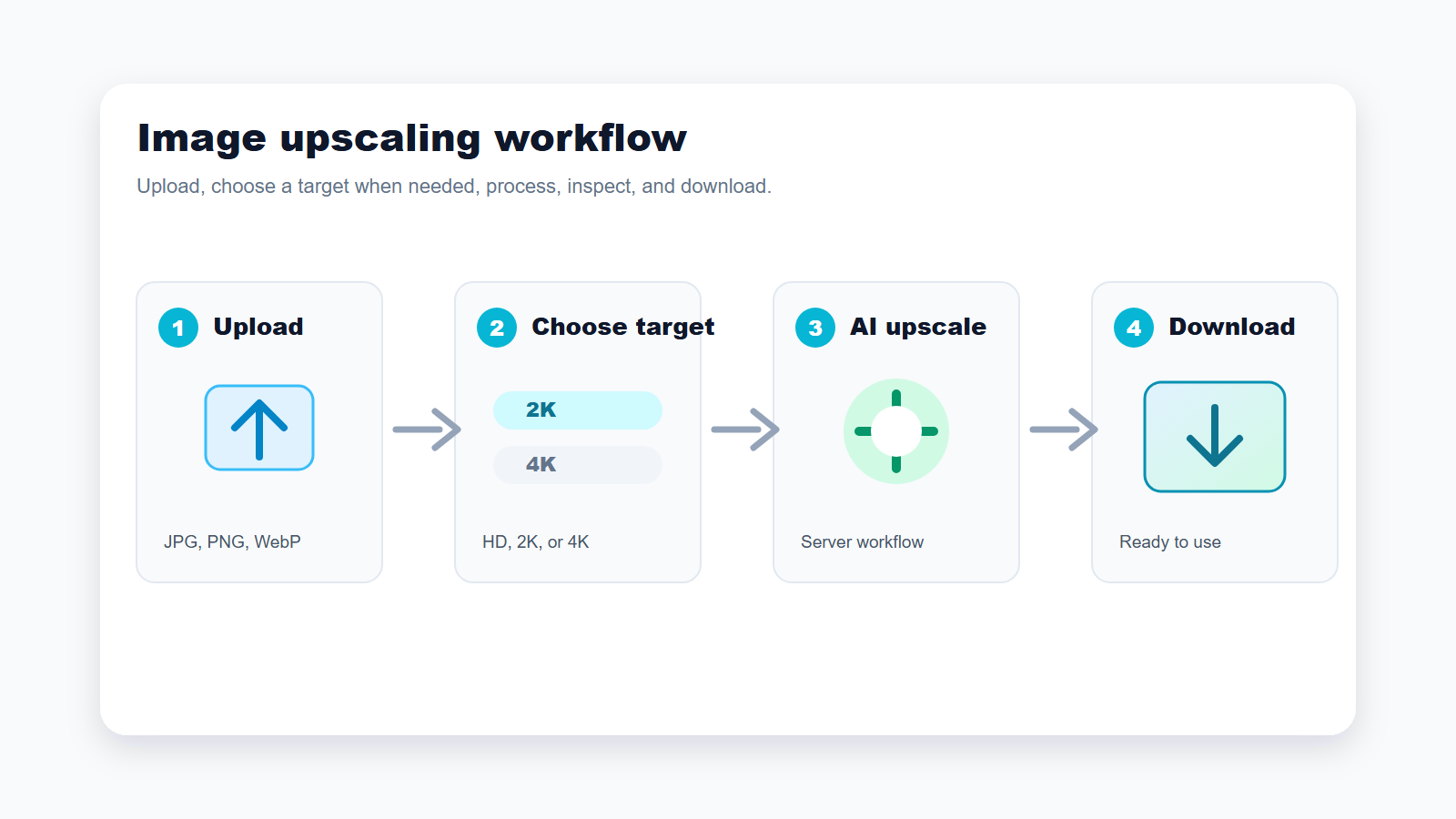
Gamitin ang pinakamaikling path kung kailangan lang ng mas malinis na image; gumamit ng target-based flow kapag mahalaga ang final size.
1. Magsimula sa pinakamalinaw na source image
Pumili ng pinakamalinaw na source bago mag-upload. Mas okay ang camera original, design export, o supplier file kaysa compressed screenshot.
AI upscaling analyzes visible pixels and generates context-aware detail. A clear image can become a better web asset, while a tiny thumbnail remains limited.
2. Mag-upload ng supported file
Ang homepage flow ay tumatanggap ng JPG, PNG, at WebP hanggang 10 MB. JPG para sa photos, PNG para sa UI at transparency, WebP para sa web delivery.
If your file is AVIF, HEIC, TIFF, or another format, convert it first unless the public interface changes. Availability may vary.
3. Piliin ang tamang output target
Gamitin ang homepage para sa mabilis na result; gamitin ang HD Image Converter kung mahalaga ang final size. Madalas sapat ang 2K para sa blog, product card, at social.
Do not choose 4K only because it sounds better. Large output can make artifacts more visible if the source is weak.
4. Patakbuhin ang upscale
Server-side ang processing, kaya hindi nakalantad sa browser ang internal AI credentials. Processing time may vary depende sa size, 4K target, at capacity.
Kung mabigo ang processing, subukan ang mas malinaw na source, mas maliit na target, o mas maliit na file.
5. Ikumpara ang resulta bago gamitin
I-check ang product edges, faces, text, logos, hair, fabric, at fine lines bago i-publish. Kung mukhang artificial, bawasan ang target o palitan ang source.
Kung nagbago ang text, faces, labels, o product details, huwag i-publish nang walang correction.
6. I-download at i-export
WebP is often good for websites; PNG for transparency; JPG for email, marketplaces, and sharing. Keep a high-quality copy before recompression.
Maaaring mawala ang benefit ng upscaling kapag paulit-ulit ang compression, kaya magtago ng high-quality copy bago ang final optimization.
Mga tala bawat feature
Simpleng upload
Maikli ang upload flow ng UpscaleIMG dahil karamihan ng users ay gusto ng usable asset agad, hindi professional editing lesson.
Server-side processing
Tinutulungan ng server-side workflow na manatiling wala sa browser ang internal AI at storage configuration habang pinamamahalaan ang upload, transformation, at output delivery.
Supported formats at limits
As of the latest public information available, sinusuportahan ng homepage upload tool ang JPG, PNG, at WebP hanggang 10 MB. Maaaring magbago ang limits.
Kalidad ng output
Pinakamaganda ang AI upscaling kapag may sapat na structure ang source image. Ang sobrang blurry, dark, o heavily compressed na source ay maaaring kailangan pa rin ng manual retouching.
Mga rekomendasyon ayon sa use case
Product photos para sa ecommerce
Gamitin ang AI upscaling kapag masyadong maliit ang supplier images para sa listings, collection pages, o ads. Suriin ang labels, color, texture, at edges bago mag-publish.
Blog images at website graphics
Para sa blog headers, tutorials, at landing page sections, karaniwang sapat ang 2K. I-compress ang final asset para sa web performance.
Social media posts
Nakakatulong ang upscaling kapag napalambot ng crop ang graphic. Iwasang i-overprocess ang faces at text dahil madalas pang i-compress ng platforms ang uploads.
AI art at generated images
Maaaring maganda ang generated images pero maliit para sa banners o posters. Pagkatapos ng upscaling, i-check ang hands, faces, at repeated patterns.
Lumang photos at personal images
Maaaring gawing mas kaaya-ayang tingnan ng AI ang lumang photos, pero hindi ito full restoration para sa scratches, stains, missing areas, o severe blur.
Decision guide: alin ang pipiliin?
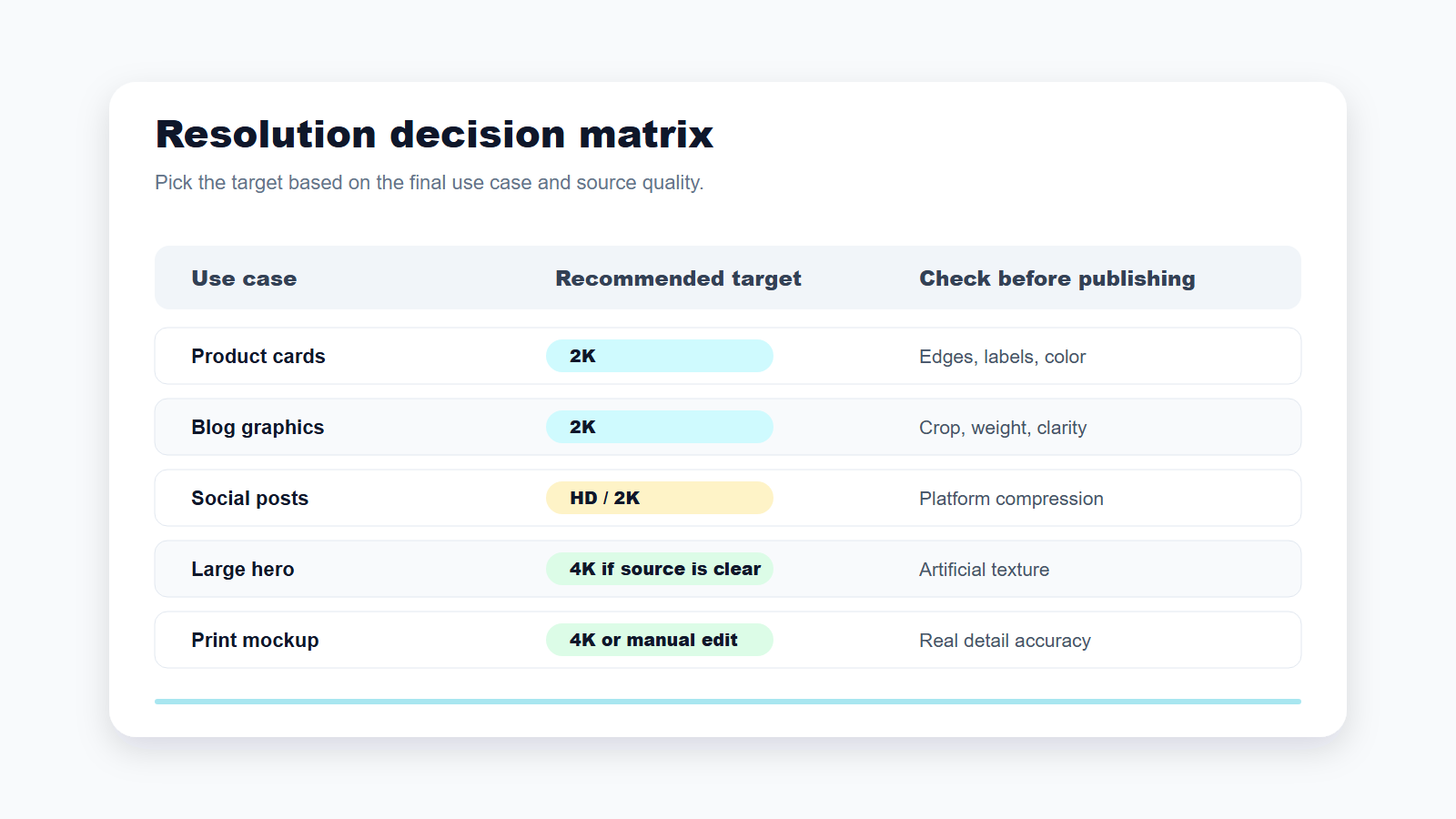
Piliin ang target batay sa kung saan gagamitin ang image, hindi dahil ito ang pinakamalaking number.
Para sa blogs, product cards, social posts, o karaniwang website sections, magsimula sa 2K o default homepage flow. Para sa malalaking hero, print mockup, presentation background, o display screen, subukan lang ang 4K kung malinaw na ang source image.
Kung mukhang artificial ang output, bawasan ang target o pagandahin ang source. Mas mabuti ang mas maliit pero malinis na image kaysa mas malaking mukhang fake.
Pricing at access caveats
As of the latest public information available from the current UpscaleIMG project content, the homepage workflow is described as no-signup for trying the image upscaler. Current public pricing could not be confirmed from this environment. Check the live product and legal pages for higher limits, batch processing, API access, or commercial terms. Availability may vary.
Mga karaniwang mali
Huwag mag-upscale ng napakaliit na thumbnail at umasa ng studio-quality product image. Huwag gawing default ang 4K. Huwag mag-publish ng AI-upscaled product photo nang hindi chine-check ang details. Huwag mag-upload ng confidential images kung hindi ito pinapayagan ng privacy terms at internal rules.
FAQ
Ano ang ibig sabihin ng pag-upscale ng image?
Ibig sabihin nito ay pagtaas ng pixel dimensions para ma-display o ma-print nang mas malaki ang image.
Pareho ba ang AI upscaling at sharpening?
Hindi. Ang sharpening ay nagpapataas ng edge contrast; ang AI upscaling ay nagpapataas ng resolution at nagre-reconstruct ng detail.
Maaari bang mag-upscale nang walang quality loss?
Madalas makakuha ng mas malaki at mas malinis na result, pero depende ito sa source.
Anong file types ang supported ng UpscaleIMG?
As of the latest public information available, JPG, PNG, at WebP hanggang 10 MB.
2K ba o 4K ang pipiliin?
Piliin ang 2K para sa karamihan ng web, ecommerce, at social uses; piliin ang 4K para sa malaking output na may malinaw na source.
Is UpscaleIMG free?
Ang homepage flow ay inilalarawan bilang puwedeng subukan nang walang signup. I-verify ang current pricing at limits sa live site.
Kaya bang ayusin ng AI ang blurry text?
Minsan nakakatulong ito sa edges, pero maaari nitong i-distort ang letters. Suriin ang text manually.
Puwede bang gamitin ang upscaled images sa ecommerce?
Oo, kung may image rights ka at accurate pa ring nire-represent ng output ang produkto.
Sources checked
- UpscaleIMG homepage: https://upscaleimg.net/
- UpscaleIMG HD Image Converter: https://upscaleimg.net/hd-image-converter
- Kasalukuyang project source para sa homepage copy, upload limits, supported formats, at server-side processing behavior.
- Kasalukuyang project source para sa HD, 2K, at 4K converter flow.
- Hindi tiyak ang direktang access sa live site mula sa environment na ito, kaya iniiwasan ang hindi na-verify na pricing, release dates, model parameters, at paid-plan claims.

