

A good upscaling workflow starts with a usable source image, a clear output target, and a final inspection.
小さい画像は実務で問題になります。商品写真がlistingで甘く見えたり、blog graphicがretina displayでぼけたり、AI art exportがbannerには小さすぎたりします。Upscalingはpixel dimensionsを増やす処理で、AIは周囲に合うdetailを推定します。
基本的なresizeは既存のpixelを伸ばすだけです。AI upscalingは、自然に見えるdetailを推定し、輪郭を改善し、低解像度画像を大きく伸ばしたときのブロック状の乱れを減らそうとします。
UpscaleIMGでJPG、PNG、WebPをuploadし、AI upscalerを実行し、previewを確認してdownloadします。HD、2K、4Kの明確なtargetが必要な場合は HD Image Converter を使います。
クイック回答: 画像をどうアップスケールするか
Open UpscaleIMG, upload a JPG, PNG, or WebP image, run the AI upscaler, preview the result, and download the improved file. For HD, 2K, or 4K targets, use HD Image Converter.
良い結果には、もっとも鮮明なsource fileから始めます。AIは小さい画像や圧縮画像を改善できますが、元画像に存在しないdetailを完全には復元できません。
アップスケール方法の比較
| 方法 | 向いている用途 | 強み | 注意点 |
|---|---|---|---|
| 基本 resize | 小さなサイズ調整と layout 修正 | 速く、予測しやすく、offlineでも使える | 大きく伸ばすと輪郭がぼけやすい |
| AI image upscaler | 商品写真、portrait、social graphic、AI art、blog image | pixelを伸ばすだけでなくdetailを補う | 元画像品質と処理可用性に左右される |
| Photoshopなどの手動編集 | retouchが必要な重要 asset | sharpness、mask、cleanup、exportを細かく制御 | 時間とスキルが必要 |
| UpscaleIMG HD Image Converter | HD、2K、4K出力 | browser上でtargetを選びやすい | 弱い元画像では大きなtargetが不安定になることがある |
小さなlayout修正には基本resize、見た目の品質改善にはAI upscaling、重要なassetには手動編集を使います。
UpscaleIMG が向いている用途
UpscaleIMGはupload、server-side AI workflow、preview、downloadに集中したonline image upscalerです。As of the latest public information available、homepage uploadはJPG、PNG、WebPを10 MBまで受け付け、signupなしで試せる流れとして説明されています。
HD Image Converterは、明確なoutput targetを選びたいユーザー向けです。upload、HD/2K/4K選択、process、preview、downloadの順に進みます。
ステップ別 workflow
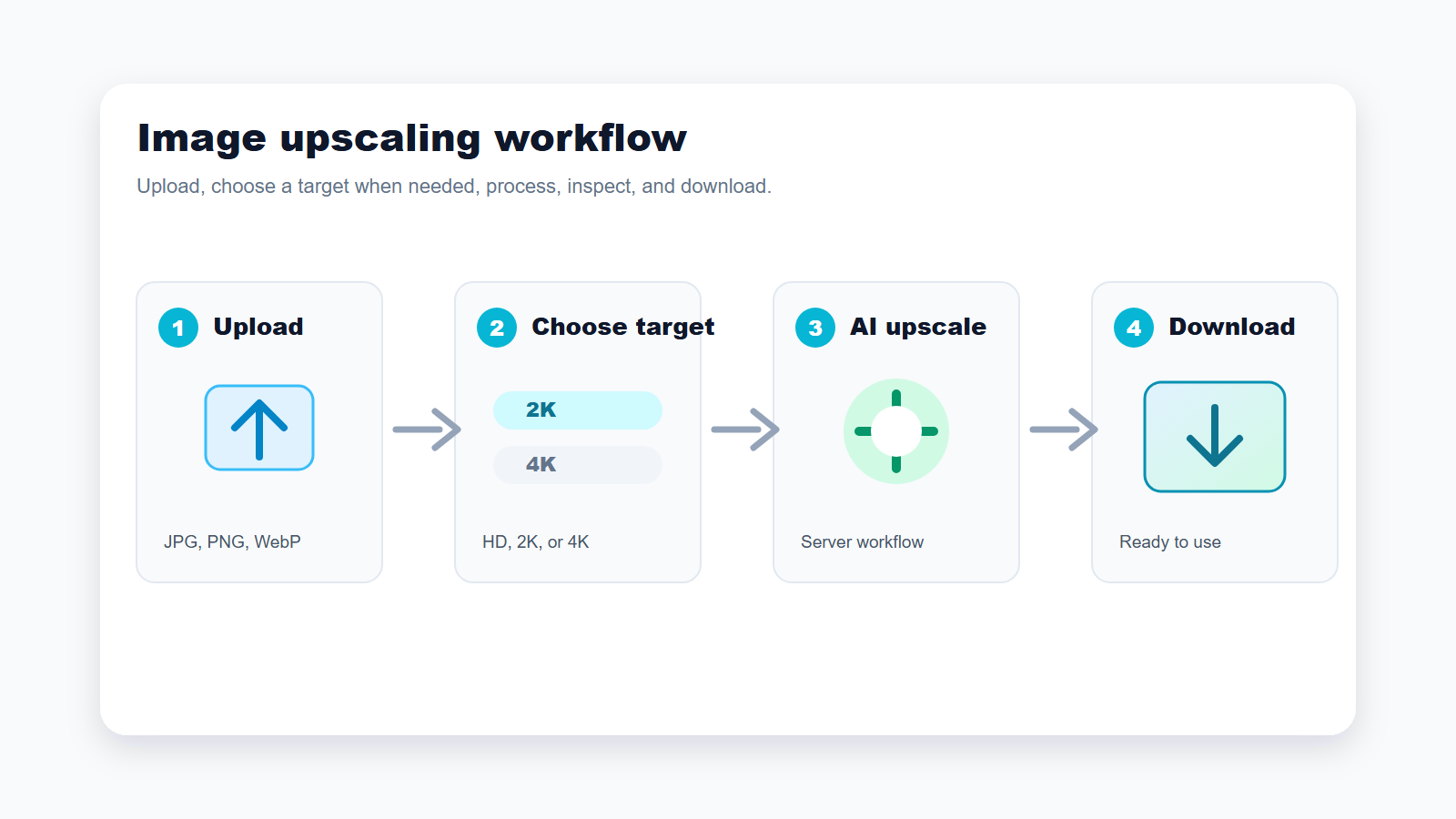
Use the shortest path when you need a cleaner image; switch to a target-based flow when final size matters.
1. Start with the best source image
upload前にもっともきれいなsourceを選びます。camera original、design export、supplier fileは、圧縮されたscreenshotより良い結果になりやすいです。
AI upscaling analyzes visible pixels and generates context-aware detail. A clear image can become a better web asset, while a tiny thumbnail remains limited.
2. Upload a supported file
homepage flowはJPG、PNG、WebPを10 MBまで扱います。写真はJPG、UIやtransparencyはPNG、web deliveryにはWebPが向いています。
If your file is AVIF, HEIC, TIFF, or another format, convert it first unless the public interface changes. Availability may vary.
3. Choose the right output target
すばやくきれいにしたいだけならhomepage flowで十分です。final sizeが重要ならHD Image ConverterでHD、2K、4Kを選びます。blog、product card、socialではまず2Kが現実的です。
Do not choose 4K only because it sounds better. Large output can make artifacts more visible if the source is weak.
4. Run the upscale
処理はserver routeで行われ、browserに内部AI credentialを出しません。file size、4K target、current capacityによって時間は変わります。
処理に失敗した場合は、よりきれいなsource、小さいtarget、または小さいfileを試してください。
5. Compare the result before use
公開前にproduct edge、face、text、logo、hair、fabric、fine lineを実際の使用サイズで確認します。不自然ならtargetを下げるかsourceを変えます。
text、face、label、product detailが変わった場合は、修正せずに公開しないでください。
6. Download and export
WebではWebPが便利です。transparencyにはPNG、emailやmarketplaceにはJPGが実用的です。再圧縮の前に高品質コピーを残してください。
繰り返しcompressionするとupscalingの効果が失われるため、final optimizationの前に高品質コピーを残してください。
機能別メモ
シンプルなupload
UpscaleIMGはupload flowを短く保っています。多くのユーザーはprofessional editingを学びたいのではなく、使えるassetを早く得たいからです。
server-side processing
server-side workflowは、upload、transformation、output deliveryを管理しながら、internal AIやstorage configurationをbrowserに出さないようにします。
対応formatと制限
As of the latest public information available、homepage upload toolはJPG、PNG、WebPを10 MBまでサポートします。この制限は変わる可能性があります。
出力品質
AI upscalingはsource imageに十分な構造があるときに最も効果的です。非常にぼけた、暗い、または強く圧縮されたsourceはmanual retouchingが必要な場合があります。
用途別おすすめ
ecommerceの商品写真
supplier imageがlisting、collection page、adsには小さすぎる場合にAI upscalingを使います。公開前にlabel、color、texture、edgeを確認してください。
blog imageとwebsite graphic
blog header、tutorial、landing page sectionでは通常2Kで十分です。web performanceのためにfinal assetを圧縮してください。
social media post
cropでgraphicが甘くなった場合、upscalingが役立ちます。platformはuploadを再圧縮することが多いため、faceやtextを過処理しないでください。
AI artと生成画像
generated imageは美しくてもbannerやposterには小さすぎることがあります。upscaling後はhand、face、repeated patternを確認してください。
古い写真と個人画像
AIは古い写真を見やすくできますが、scratch、stain、missing area、severe blurを直すfull restorationではありません。
判断ガイド: どの設定を選ぶか
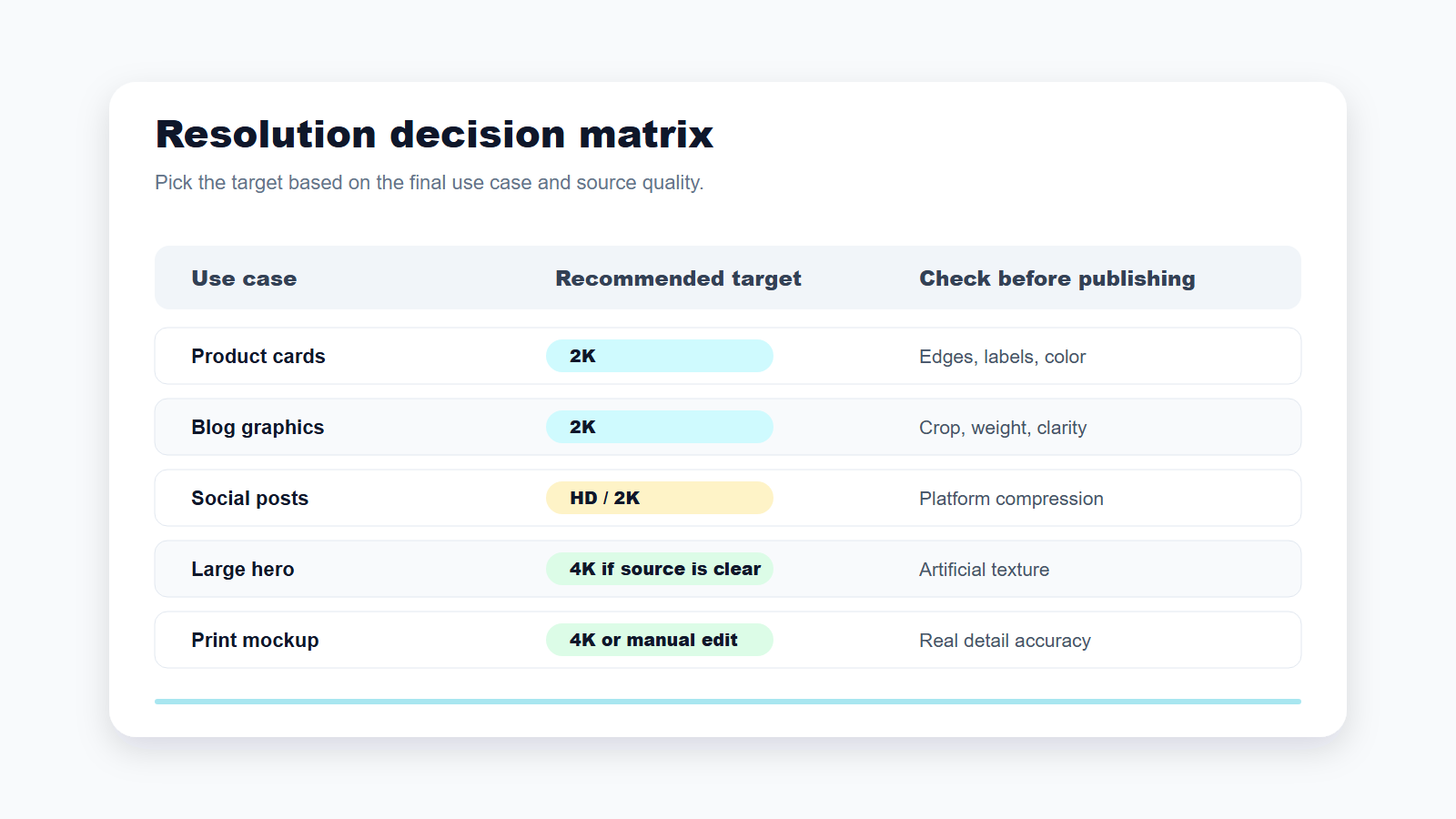
最も大きい数字ではなく、画像をどこで使うかに合わせてtargetを選びます。
blog、product card、social post、通常のwebsite sectionでは、2Kまたはdefault homepage flowから始めます。大きなhero、print mockup、presentation background、display screenでは、source imageがすでに鮮明な場合だけ4Kを試します。
outputが不自然に見える場合は、targetを下げるかsourceを改善します。大きくても不自然な画像より、小さくてもきれいな画像のほうが有用です。
料金とアクセスの注意点
As of the latest public information available from the current UpscaleIMG project content, the homepage workflow is described as no-signup for trying the image upscaler. Current public pricing could not be confirmed from this environment. Check the live product and legal pages for higher limits, batch processing, API access, or commercial terms. Availability may vary.
よくある失敗
小さなthumbnailをupscaleしてstudio-qualityの商品写真を期待しないでください。4Kをdefaultにしないでください。detailを確認せずにAI-upscaledの商品写真を公開しないでください。privacy termsとinternal rulesが許可しないconfidential imageはuploadしないでください。
FAQ
画像をアップスケールするとはどういう意味ですか?
画像をより大きく表示または印刷できるようにpixel dimensionsを増やすことです。
AI upscalingはsharpeningと同じですか?
いいえ。sharpeningはedge contrastを高め、AI upscalingはresolutionを上げてdetailを再構成します。
品質を落とさずにアップスケールできますか?
多くの場合、より大きくきれいな結果を得られますが、sourceに左右されます。
UpscaleIMGはどのfile typeに対応していますか?
As of the latest public information available、JPG、PNG、WebPを10 MBまでサポートします。
2Kと4Kのどちらを選ぶべきですか?
多くのweb、ecommerce、social用途では2Kを選びます。大きなoutputが必要でsourceが鮮明な場合に4Kを選びます。
Is UpscaleIMG free?
homepage flowはsignupなしで試せるものとして説明されています。current pricingとlimitはlive siteで確認してください。
AIはぼけたtextを直せますか?
edgeを改善することはありますが、letterを歪ませる場合があります。textは必ず手動で確認してください。
アップスケール画像をecommerceに使えますか?
image rightsがあり、outputがproductを正確に表している場合は使用できます。
確認した情報源
- UpscaleIMG homepage: https://upscaleimg.net/
- UpscaleIMG HD Image Converter: https://upscaleimg.net/hd-image-converter
- homepage copy、upload limit、supported format、server-side processing behaviorを確認した現在のproject source。
- HD、2K、4K converter flowを確認した現在のproject source。
- この環境ではlive siteへの直接アクセスが不確実だったため、未確認のpricing、release date、model parameter、paid planの主張は避けています。

