

A good upscaling workflow starts with a usable source image, a clear output target, and a final inspection.
چھوٹی images عملی مسائل پیدا کرتی ہیں: product photo listing پر soft لگتی ہے، blog graphic retina screen پر blur ہوتا ہے، یا AI art banner کے لئے چھوٹا رہتا ہے۔ Upscaling pixels dimensions بڑھاتا ہے؛ AI plausible detail build کرنے کی کوشش کرتی ہے۔
Basic resize صرف existing pixels کو کھینچتا ہے۔ AI upscaling plausible detail بنانے، edges بہتر کرنے، اور low-resolution image کو بہت زیادہ بڑھانے پر آنے والے blocky artifacts کم کرنے کی کوشش کرتی ہے.
UpscaleIMG پر JPG، PNG یا WebP upload کریں، AI upscaler چلائیں، preview دیکھیں، پھر result download کریں۔ HD، 2K یا 4K target کے لئے HD Image Converter استعمال کریں۔
فوری جواب: تصویر کیسے upscale کریں؟
Open UpscaleIMG, upload a JPG, PNG, or WebP image, run the AI upscaler, preview the result, and download the improved file. For HD, 2K, or 4K targets, use HD Image Converter.
Best results کے لئے سب سے صاف source file سے شروع کریں۔ AI چھوٹی یا compressed image بہتر کر سکتی ہے، مگر اصل میں نہ ہونے والی detail واپس نہیں لا سکتی.
Upscaling methods کا موازنہ
| Method | Best for | Strengths | Tradeoffs |
|---|---|---|---|
| Basic resize in editor | چھوٹی size تبدیلیاں اور quick layout fixes | تیز، predictable، offline | Edges blur ہو سکتے ہیں |
| AI image upscaler | Product photos، portraits، social، AI art، blog images | Pixels stretch کرنے کے بجائے detail rebuild کرتا ہے | Source quality اور availability پر depend کرتا ہے |
| Manual editing in Photoshop | اہم assets جنہیں retouch چاہیے | Sharpness، masks اور export پر مکمل control | آہستہ اور skill چاہیے |
| UpscaleIMG HD Image Converter | HD، 2K یا 4K output | Browser میں simple target selection | Weak source پر large targets slow ہو سکتے ہیں |
چھوٹے layout fixes کے لئے basic resizing، واضح quality improvement کے لئے AI upscaling، اور اہم asset کے لئے manual editing استعمال کریں۔
UpscaleIMG کس کام کے لئے بنایا گیا ہے
UpscaleIMG ایک focused online image upscaler ہے۔ Public flow مختصر ہے: upload، server-side AI workflow، preview، download۔ As of the latest public information available، homepage JPG، PNG اور WebP کو 10 MB تک support کرتا ہے اور signup کے بغیر try کیا جا سکتا ہے۔
HD Image Converter ان users کے لئے ہے جو واضح output target چاہتے ہیں۔ Sequence یہ ہے: upload، HD/2K/4K منتخب کریں، process، preview، download۔
Step-by-step workflow
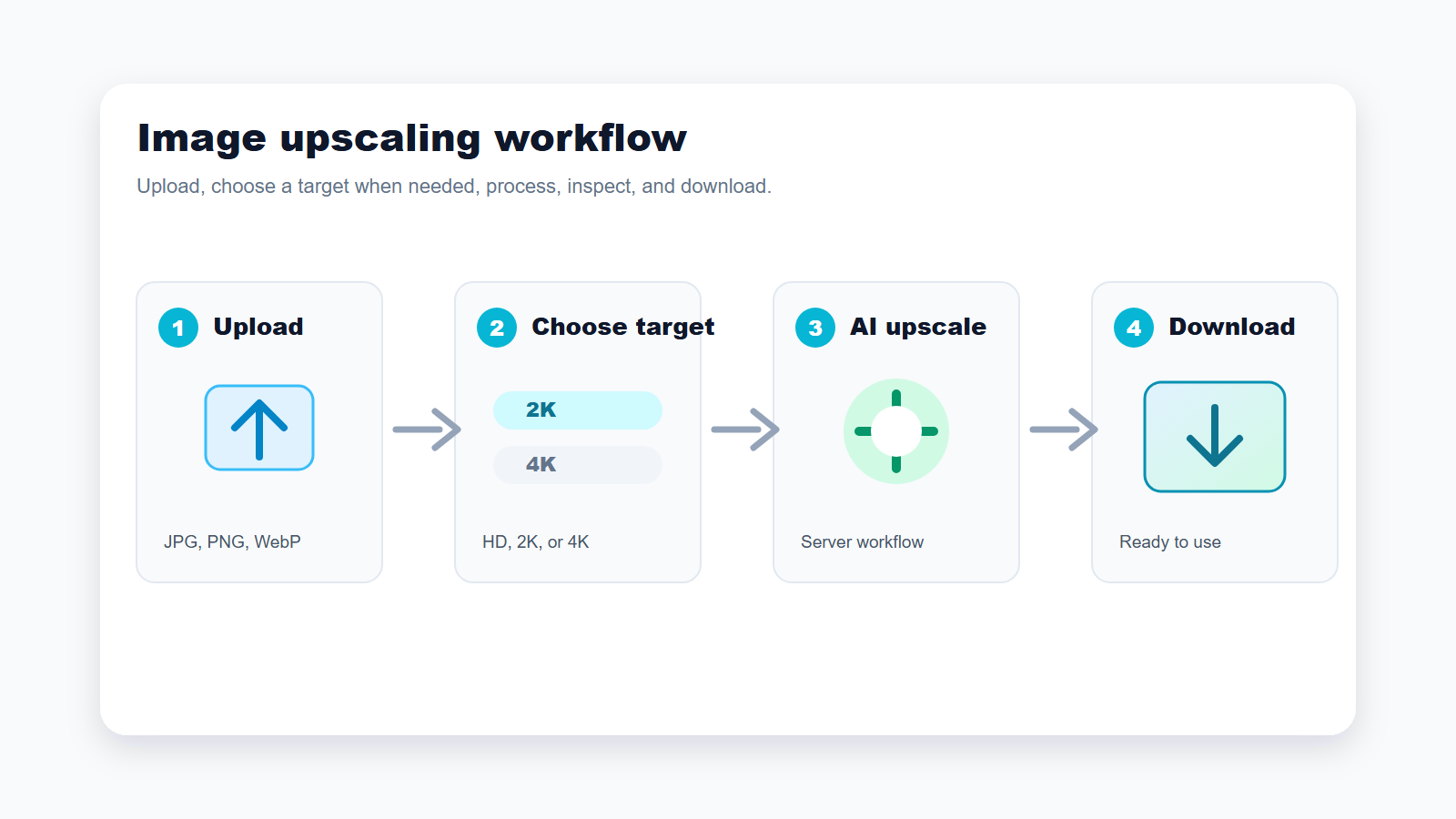
Use the shortest path when you need a cleaner image; switch to a target-based flow when final size matters.
1. Start with the best source image
Upload سے پہلے سب سے صاف source چنیں۔ Camera original، design export یا supplier file عموما compressed screenshot سے بہتر ہوتا ہے۔
AI upscaling analyzes visible pixels and generates context-aware detail. A clear image can become a better web asset, while a tiny thumbnail remains limited.
2. Upload a supported file
Homepage flow JPG، PNG اور WebP کو 10 MB تک accept کرتا ہے۔ Photos کے لئے JPG، UI یا transparency کے لئے PNG، web delivery کے لئے WebP بہتر ہے۔
If your file is AVIF, HEIC, TIFF, or another format, convert it first unless the public interface changes. Availability may vary.
3. Choose the right output target
Quick result کے لئے homepage flow کافی ہے۔ Final size اہم ہو تو HD Image Converter میں HD، 2K یا 4K چنیں۔ Blog، product card اور social کے لئے عموما 2K سے شروع کریں۔
Do not choose 4K only because it sounds better. Large output can make artifacts more visible if the source is weak.
4. Run the upscale
Processing server route سے ہوتی ہے، اس لئے internal AI credentials browser میں expose نہیں ہوتے۔ Time file size، 4K target اور current capacity کے مطابق vary کر سکتا ہے۔
اگر processing fail ہو تو صاف source، چھوٹا target، یا چھوٹا file try کریں۔
5. Compare the result before use
Publish سے پہلے product edges، faces، text، logos، hair، fabric اور fine lines check کریں۔ Result artificial لگے تو target کم کریں یا source بدلیں۔
اگر text، faces، labels، یا product details بدل جائیں تو correction کے بغیر publish نہ کریں۔
6. Download and export
Web کے لئے WebP اکثر اچھا final format ہے؛ transparency کے لئے PNG؛ email اور marketplace کے لئے JPG۔ Recompression سے پہلے high-quality copy محفوظ رکھیں۔
بار بار compression upscaling کا فائدہ ختم کر سکتی ہے، اس لئے final optimization سے پہلے high-quality copy رکھیں۔
Feature-by-feature notes
آسان upload
UpscaleIMG upload flow مختصر رکھتا ہے کیونکہ اکثر users professional editing lesson نہیں بلکہ جلد usable asset چاہتے ہیں۔
Server-side processing
Server-side workflow upload، transformation، اور output delivery manage کرتے ہوئے internal AI اور storage configuration کو browser سے باہر رکھتا ہے۔
Supported formats اور limits
As of the latest public information available، homepage upload tool JPG، PNG، اور WebP images کو 10 MB تک support کرتا ہے۔ یہ limits بدل سکتی ہیں۔
Output کی quality
AI upscaling تب بہتر کام کرتی ہے جب source image میں کافی structure ہو۔ بہت blurry، dark، یا heavily compressed sources کو manual retouching چاہیے ہو سکتی ہے۔
Use case recommendations
Ecommerce کے product photos
جب supplier images listings، collection pages، یا ads کے لئے بہت چھوٹی ہوں تو AI upscaling استعمال کریں۔ Publish سے پہلے labels، color، texture، اور edges check کریں۔
Blog images اور website graphics
Blog headers، tutorials، اور landing page sections کے لئے عموما 2K کافی ہے۔ Web performance کے لئے final asset compress کریں۔
Social media posts
Cropping کے بعد graphic soft ہو جائے تو upscaling مدد کرتی ہے۔ Faces اور text کو overprocess نہ کریں کیونکہ platforms عموما uploads دوبارہ compress کرتے ہیں۔
AI art اور generated images
Generated images خوبصورت ہو سکتی ہیں مگر banners یا posters کے لئے چھوٹی۔ Upscaling کے بعد hands، faces، اور repeated patterns inspect کریں۔
پرانی photos اور personal images
AI پرانی photos کو بہتر دکھا سکتی ہے، مگر scratches، stains، missing areas، یا severe blur کے لئے full restoration نہیں ہے۔
Decision guide: کون سی setting منتخب کریں؟
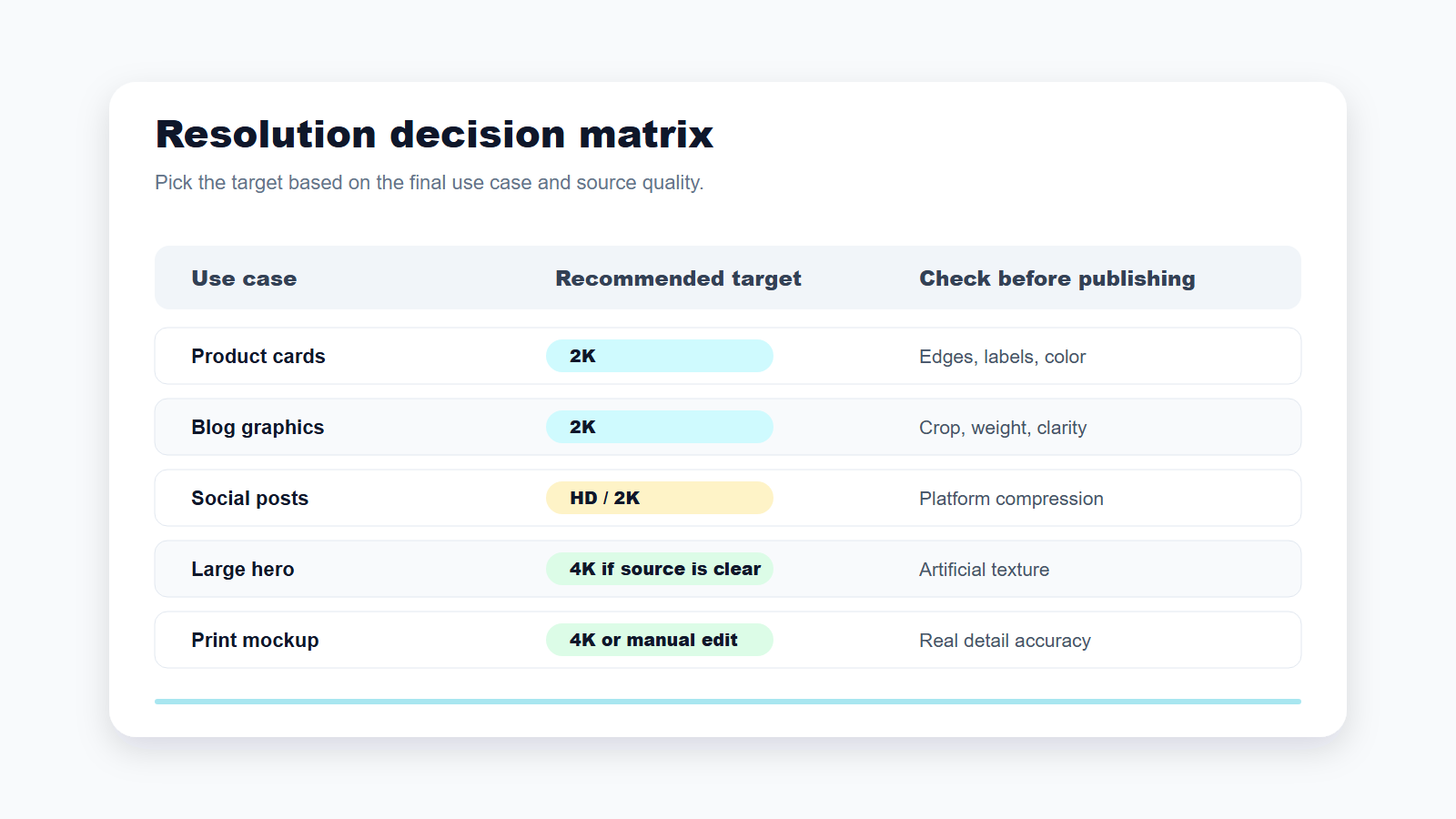
Target اس بنیاد پر چنیں کہ image کہاں استعمال ہوگی، نہ کہ سب سے بڑے number کی بنیاد پر۔
Blogs، product cards، social posts، یا عام website sections کے لئے 2K یا default homepage flow سے شروع کریں۔ Large heroes، print mockups، presentation backgrounds، یا display screens کے لئے 4K صرف تب try کریں جب source image پہلے سے clear ہو۔
اگر output artificial لگے تو target کم کریں یا source بہتر کریں۔ چھوٹی مگر clean image بڑی fake-looking image سے بہتر ہے۔
Pricing اور access caveats
As of the latest public information available from the current UpscaleIMG project content, the homepage workflow is described as no-signup for trying the image upscaler. Current public pricing could not be confirmed from this environment. Check the live product and legal pages for higher limits, batch processing, API access, or commercial terms. Availability may vary.
عام غلطیاں
Tiny thumbnail کو upscale کر کے studio-quality product image کی توقع نہ کریں۔ 4K default نہ بنائیں۔ Details check کئے بغیر AI-upscaled product photo publish نہ کریں۔ Privacy terms اور internal rules اجازت نہ دیں تو confidential images upload نہ کریں۔
FAQ
تصویر upscale کرنے کا مطلب کیا ہے؟
اس کا مطلب pixel dimensions بڑھانا ہے تاکہ image بڑی display یا print ہو سکے۔
کیا AI upscaling sharpening جیسی ہے؟
نہیں۔ Sharpening edge contrast بڑھاتی ہے؛ AI upscaling resolution بڑھاتی اور detail reconstruct کرتی ہے۔
کیا quality loss کے بغیر upscale کیا جا سکتا ہے؟
اکثر زیادہ clean اور بڑی result مل سکتی ہے، مگر یہ source پر depend کرتا ہے۔
UpscaleIMG کون سے files support کرتا ہے؟
As of the latest public information available، JPG، PNG، اور WebP کو 10 MB تک support کیا جاتا ہے۔
2K یا 4K میں کیا چنوں؟
زیادہ تر web، ecommerce، اور social uses کے لئے 2K چنیں؛ clear source کے ساتھ large output کے لئے 4K چنیں۔
Is UpscaleIMG free?
Homepage flow کو no-signup trial کے طور پر describe کیا گیا ہے۔ Current pricing اور limits live site پر verify کریں۔
کیا AI blurry text ٹھیک کر سکتی ہے؟
کبھی edges بہتر ہوتے ہیں، مگر letters distort ہو سکتے ہیں۔ Text manually inspect کریں۔
کیا upscaled images ecommerce میں استعمال ہو سکتی ہیں؟
ہاں، اگر آپ کے پاس image rights ہیں اور output product کو accurate دکھاتا ہے۔
Sources checked
- UpscaleIMG homepage: https://upscaleimg.net/
- UpscaleIMG HD Image Converter: https://upscaleimg.net/hd-image-converter
- Homepage copy، upload limits، supported formats، اور server-side processing behavior کے لئے موجودہ project source.
- HD، 2K، اور 4K converter flow کے لئے موجودہ project source.
- اس environment سے live site تک direct access uncertain تھا، اس لئے unverified pricing، release dates، model parameters، اور paid-plan claims سے گریز کیا گیا.

