

بہترین مفت image upscaler اس بات پر منحصر ہے کہ آپ software سے کیا مراد لیتے ہیں: installed desktop app، online tool، یا design-suite feature۔
ایمان دار جواب یہ ہے:
اگر آپ کا مطلب ایک مکمل مفت desktop app ہے جسے آپ install کر سکتے ہیں، تو تصویر کو مفت upscale کرنے کے لیے بہترین software عموماً Upscayl ہے۔ یہ open source ہے، مقامی طور پر چلتا ہے، اور ان لوگوں کے لیے سب سے صاف جواب ہے جو خاص طور پر installed freeware چاہتے ہیں۔
اگر آپ کا مطلب یہ ہے کہ کچھ install کیے بغیر تصویر کو upscale کرنے کا بہترین مفت طریقہ کیا ہے، تو بہتر شروعات UpscaleIMG ہے۔ یہ اس کام کے لیے بنایا گیا ہے جس کی اکثر لوگوں کو حقیقت میں ضرورت ہوتی ہے: تصویر upload کریں، AI سے اسے بڑا کریں، نتیجہ compare کریں، اور browser میں ایک زیادہ sharp version download کریں۔
یہ فرق اہم ہے۔
لوگ “software” تلاش کرتے ہیں، جبکہ اصل مسئلہ software نہیں ہوتا۔ اصل مسئلہ ایک چھوٹی، دھندلی، compressed، یا کم سائز والی تصویر ہوتی ہے جسے product page، blog post، social graphic، presentation، یا AI art workflow میں بہتر نظر آنا چاہیے۔ Desktop app install کرنا صحیح جواب ہو سکتا ہے۔ اکثر اوقات یہ ضروری نہیں ہوتا۔
یہ guide عملی جواب دیتی ہے۔ یہ بہترین مفت image upscaler options کا موازنہ کرتی ہے، بتاتی ہے کہ UpscaleIMG کہاں fit ہوتا ہے، دکھاتی ہے کہ desktop software کب بہتر ہے، اور آپ کو ایک سادہ workflow دیتی ہے تاکہ images کو upscale کرتے وقت وہ جعلی نہ لگیں۔
فوری جواب
زیادہ تر users کے لیے بہترین مفت image upscaling choice یہ ہے:
| صورتحال | بہترین مفت option |
|---|---|
| تیز online image upscaling | UpscaleIMG |
| واقعی مفت desktop software | Upscayl |
| آپ پہلے ہی Adobe tools میں edit کر رہے ہیں | Adobe Express image upscaler |
| آپ پہلے ہی Canva میں design کر رہے ہیں | Canva image upscaler |
| free credits کے ساتھ simple online test | Upscale.media، Pixelcut، Icons8، یا اسی طرح کے freemium tools |
| anime یا illustration upscaling | Upscayl یا waifu2x-style tools |
| exact logos یا text-heavy graphics | AI upscaling پر بھروسہ کرنے کے بجائے asset کو دوبارہ build کریں |
میری عملی recommendation:
UpscaleIMG سے شروع کریں اگر آپ web images، ecommerce photos، social posts، blog graphics، اور AI-generated art کے لیے fastest free online workflow چاہتے ہیں۔
Upscayl استعمال کریں اگر آپ local desktop app، cloud upload نہ کرنے، اور models اور files پر زیادہ control چاہتے ہیں۔
Adobe Express یا Canva استعمال کریں اگر آپ کی image پہلے ہی ان design ecosystems کے اندر ہے اور آپ کو بڑے edit کے حصے کے طور پر صرف quick upscale چاہیے۔
“free image upscaler software” کا اصل مطلب کیا ہے
یہ phrase تین مختلف چیزوں کا مطلب دے سکتی ہے:
- ایک desktop program جسے آپ install کرتے ہیں۔
- ایک free online AI image upscaler۔
- ایک design platform کے اندر free feature۔
یہ مختلف workflows ہیں۔
Desktop app آپ کو زیادہ local control دیتی ہے۔ Online upscaler تیز اور آسان ہوتا ہے۔ Design-suite upscaler تب convenient ہوتا ہے جب آپ پہلے ہی social graphic، flyer، presentation، thumbnail، یا website visual بنا رہے ہوں۔
Best choice کام پر منحصر ہے، category پر نہیں۔
اگر آپ کے پاس ایک چھوٹی JPG ہے جسے blog post میں sharp دکھانا ہے، تو desktop software download کرنا شاید ضرورت سے زیادہ ہے۔ اگر آپ private client images، unreleased product shots، یا hundreds of files process کر رہے ہیں، تو local app setup کے قابل ہو سکتی ہے۔ اگر آپ Canva میں Instagram post بنا رہے ہیں، تو Canva کے اندر رہنا زیادہ آسان ہو سکتا ہے۔
اسی لیے سنجیدہ جواب ہر شخص کے لیے ایک ہی tool نہیں ہو سکتا۔
استعمال کے لحاظ سے بہترین مفت image upscaler software
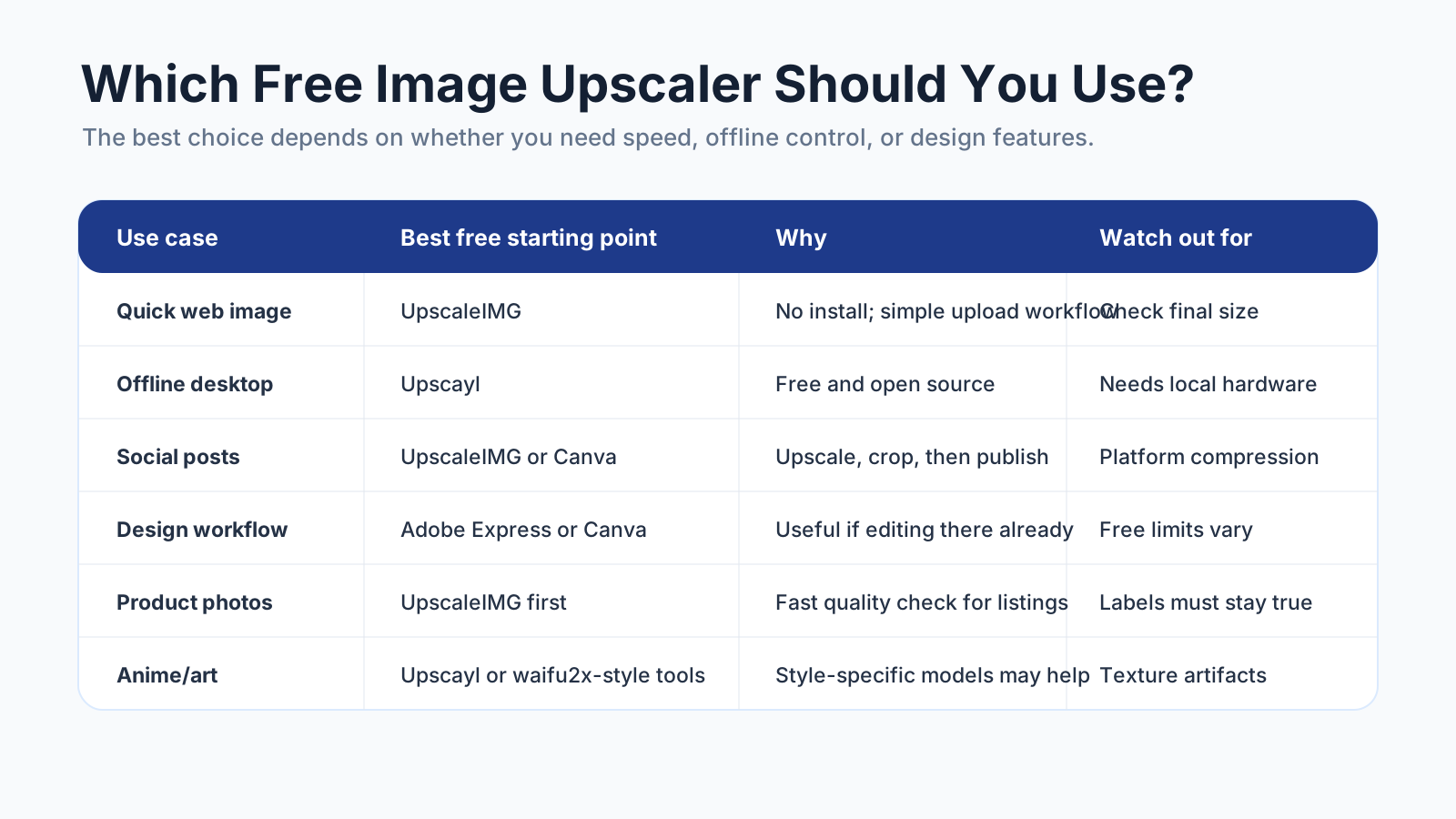
ایک free image upscaler صرف تب best ہے جب وہ image، workflow، اور final use کے مطابق ہو۔
تیز online upscaling کے لیے بہترین: UpscaleIMG
UpscaleIMG بہترین starting point ہے اگر آپ software install کیے بغیر تصویر کو مفت upscale کرنا چاہتے ہیں۔
یہی site کا core business ہے: image enhancement کو ان لوگوں کے لیے simple بنانا جنہیں جلد بہتر visuals چاہئیں۔ Workflow جان بوجھ کر direct ہے:
- ایک image upload کریں۔
- upscale level منتخب کریں۔
- enhanced result preview کریں۔
- sharper image download کریں۔
UpscaleIMG خاص طور پر ان کے لیے مفید ہے:
- Blog images
- Website graphics
- Ecommerce product photos
- Social media visuals
- AI-generated images
- Thumbnails
- Presentation images
- پرانی low-resolution photos جنہیں quick quality boost چاہیے
Value speed ہے۔ آپ کو Photoshop، GPU setup، command-line tools، یا model folder کی ضرورت نہیں۔ آپ کو browser اور ایک image چاہیے۔
موجودہ UpscaleIMG homepage 2x اور 4x AI upscaling کے گرد بنایا گیا ہے، output options جیسے JPG، PNG، اور WebP کے ساتھ۔ یہ modern input formats بھی support کرتا ہے، جن میں HEIC اور AVIF شامل ہیں، جو iPhone photos یا newer web images کے ساتھ کام کرتے وقت اہم ہے۔ Site privacy-first processing پر بھی زور دیتی ہے، جو ان users کے لیے اہم ہے جو heavy editing workflow کے بغیر quick enhancement چاہتے ہیں۔
UpscaleIMG ہر کام کے لیے درست جواب نہیں ہے۔ اگر آپ کو unlimited local batch processing، offline workflow، یا ہر model parameter پر سخت control چاہیے، تو desktop tool استعمال کریں۔ اگر آپ کو exact logo reconstruction چاہیے، تو asset کو vector editor میں دوبارہ build کریں۔
لیکن سب سے common free upscaling task کے لیے UpscaleIMG سب سے صاف online path ہے۔
بہترین واقعی مفت desktop software: Upscayl
Upscayl سب سے مضبوط جواب ہے اگر “software” سے مراد installed desktop software ہے۔
یہ ایک free اور open-source AI image upscaler ہے۔ یہ آپ کے computer پر چلتا ہے، اس لیے ان users کے لیے attractive ہے جو images کو web service پر upload نہیں کرنا چاہتے۔ یہ تب بھی بہتر fit ہے اگر آپ local models کے ساتھ experiment کرنا چاہتے ہیں یا images کو زیادہ technical workflow میں process کرنا چاہتے ہیں۔
Upscayl استعمال کریں جب:
- آپ desktop app چاہتے ہیں۔
- آپ open-source software prefer کرتے ہیں۔
- آپ files upload نہیں کرنا چاہتے۔
- آپ کے پاس AI upscaling آرام سے چلانے کے لیے کافی local hardware ہے۔
- آپ browser کے باہر بہت سی images process کرنا چاہتے ہیں۔
Tradeoff setup ہے۔ Local app powerful ہو سکتی ہے، مگر یہ پھر بھی ایک اور tool ہے جسے install، maintain، اور troubleshoot کرنا پڑتا ہے۔ ایک single web image کے لیے شاید یہ قابل نہیں۔
quick design edits کے لیے بہترین: Adobe Express
Adobe Express Adobe کے consumer design workflow کے حصے کے طور پر browser-based image upscaler پیش کرتا ہے۔ یہ تب meaningful ہے جب آپ پہلے ہی Adobe tools استعمال کرتے ہیں، polished design environment چاہتے ہیں، یا upscaling کو templates، text، backgrounds، social graphics، یا brand assets کے ساتھ combine کرنا چاہتے ہیں۔
Adobe Express استعمال کریں جب:
- آپ کے پاس پہلے ہی Adobe account ہے۔
- آپ ایک جگہ upscale اور edit کرنا چاہتے ہیں۔
- image ایک larger design کا حصہ ہے۔
- آپ کو fast creative workflow چاہیے، صرف raw enhanced file نہیں۔
Catch یہ ہے کہ free features، export options، login requirements، اور plan limits بدل سکتے ہیں۔ کسی specific free limit کے گرد repeatable workflow بنانے سے پہلے current Adobe Express page check کریں۔
social designs کے لیے بہترین: Canva
Canva کی image upscaling features تب useful ہیں جب final output پہلے ہی Canva design ہو: social post، thumbnail، flyer، presentation slide، ad mockup، یا content graphic۔
Canva استعمال کریں جب:
- آپ پہلے ہی Canva میں design کر رہے ہیں۔
- آپ کو image upscale، crop، اور template میں place کرنی ہے۔
- output social، marketing، یا lightweight design work کے لیے ہے۔
Canva ہمیشہ fastest path نہیں ہوتی اگر آپ کو صرف یہ چاہیے کہ “اس image کو sharp بنا کر download کرنے دیں۔” اس صورت میں focused tool جیسے UpscaleIMG عموماً آسان ہوتا ہے۔
بہترین freemium alternatives: Upscale.media، Pixelcut، Icons8، اور Let’s Enhance
کئی online tools free trials، limited free credits، یا free low-volume enhancement دیتے ہیں۔ Popular examples میں Upscale.media، Pixelcut، Icons8 Smart Upscaler، اور Let’s Enhance شامل ہیں۔
یہ tools اچھے options ہو سکتے ہیں اگر آپ models کے across results compare کرنا چاہتے ہیں۔ یہ کچھ images کو دوسروں سے بہتر handle کر سکتے ہیں، خاص طور پر portraits، product photos، illustrations، یا heavily compressed files۔
اہم لفظ “freemium” ہے۔ Free limits، watermarks، account requirements، commercial-use terms، اور export quality بدل سکتے ہیں۔ صرف اس لیے کسی tool کو unlimited نہ سمجھیں کہ landing page پر “free” لکھا ہے۔
Occasional image fixes کے لیے دو یا تین tools آزمانا useful ہو سکتا ہے۔ Repeatable workflow کے لیے وہ tool منتخب کریں جو quality، privacy، speed، اور predictable limits کا بہترین balance دے۔
UpscaleIMG بہترین مفت online starting point کیوں ہے
UpscaleIMG ایک narrow promise کے گرد بنایا گیا ہے: ایسی image جو بہت چھوٹی یا soft ہو، اسے AI سے زیادہ sharp بنانا۔
یہ focus اہم ہے۔
بہت سے creative platforms image upscaling کو کئی features میں سے ایک feature کے طور پر شامل کرتے ہیں۔ یہ useful ہے اگر آپ کو full design environment چاہیے۔ یہ کم useful ہے اگر آپ صرف clean before-and-after image enhancement workflow چاہتے ہیں۔
UpscaleIMG بہتر fit ہے جب آپ کو یہ چیزیں اہم ہوں:
- No-install access
- تیز browser workflow
- روزمرہ images کے لیے AI upscaling
- simple quality comparison
- web-ready enhancement
- product، blog، اور social image preparation
ہماری site کے لیے business case سیدھا ہے: زیادہ تر users کو professional retouching software کی ضرورت نہیں۔ انہیں low-resolution image کو usable بنانے کا fast way چاہیے۔
اس کا مطلب یہ نہیں کہ ہر image کو blindly upscale کرنا چاہیے۔ اس کا مطلب ہے کہ tool کو first pass easy بنانا چاہیے، تاکہ آپ اپنی توجہ quality check پر دے سکیں۔
تصویر کو مفت upscale کیسے کریں بغیر اسے خراب کیے
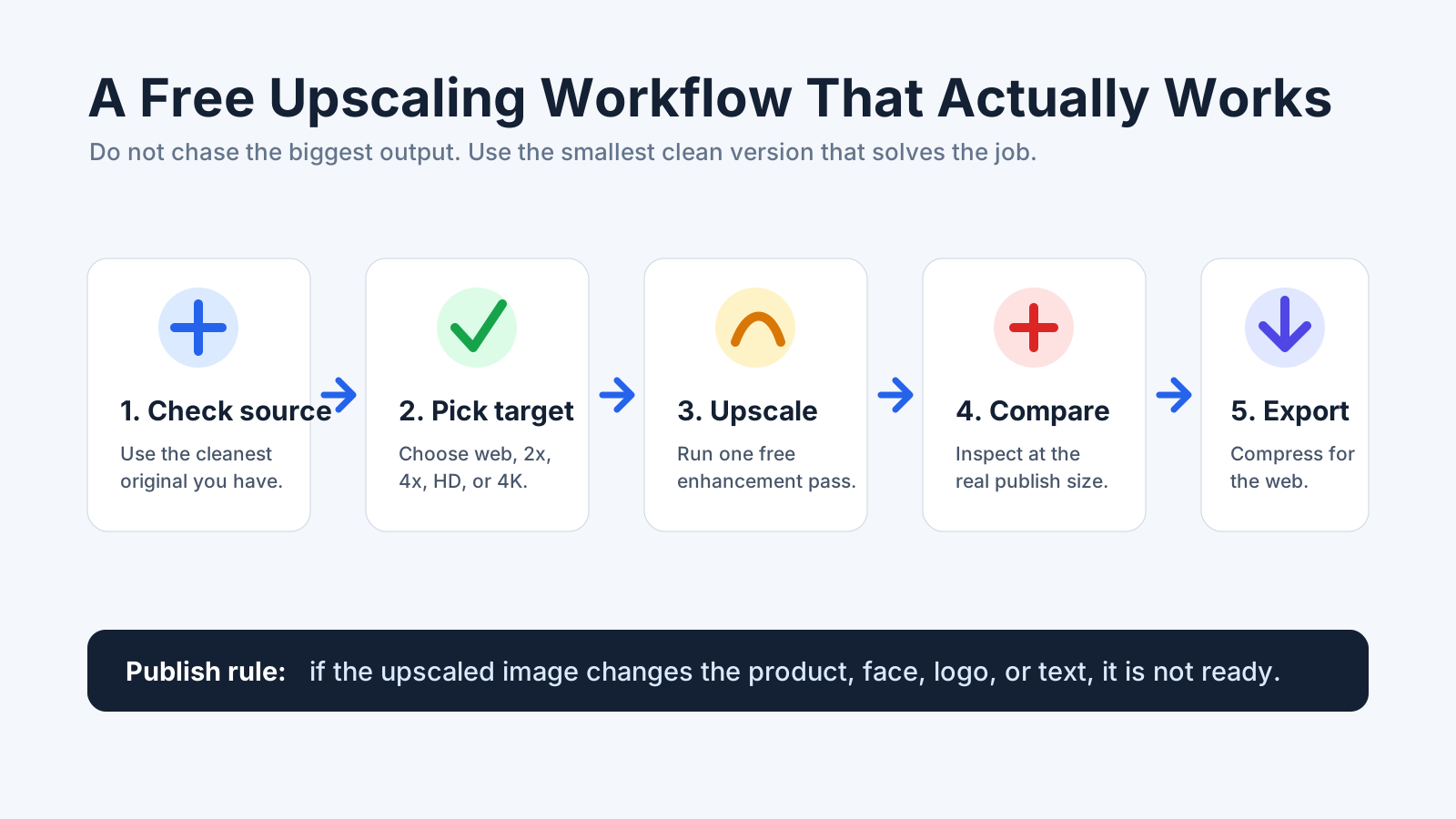
اچھا free upscaling workflow upload سے پہلے شروع ہوتا ہے اور real-size quality check پر ختم ہوتا ہے۔
یہ workflow استعمال کریں چاہے آپ UpscaleIMG، Upscayl، Canva، Adobe Express، یا کوئی اور free image upscaler منتخب کریں۔
1. سب سے صاف source سے شروع کریں
اگر original image موجود ہے تو screenshot کو upscale نہ کریں۔ اگر source file مل سکتی ہے تو compressed chat download کو upscale نہ کریں۔
AI upscaling بہترین تب کام کرتی ہے جب original میں ابھی بھی useful structure موجود ہو: edges، texture، faces، product details، اور lighting۔ ایک tiny thumbnail model کو کام کرنے کے لیے بہت کم material دیتی ہے۔
کچھ upload کرنے سے پہلے پوچھیں:
- کیا یہ میرے پاس سب سے بڑا version ہے؟
- کیا کوئی کم compressed version ہے؟
- کیا یہ کسی ایسی image کا screenshot ہے جو کہیں اور موجود ہے؟
- کیا file میں private یا client-sensitive material ہے؟
بہترین free software بھی ہر خراب source کو rescue نہیں کر سکتا۔
2. وہ سب سے چھوٹا output منتخب کریں جو کام حل کر دے
بڑا ہمیشہ بہتر نہیں ہوتا۔
4K output impressive لگتا ہے، مگر یہ artifacts کو expose کر سکتا ہے، websites کو slow کر سکتا ہے، اور آپ کی ضرورت سے بڑی file بنا سکتا ہے۔ بہت سی blog images اور web graphics کے لیے clean 2x یا 2K result کافی ہوتا ہے۔
یہ simple rule استعمال کریں:
| Final use | Practical target |
|---|---|
| Small web image | 2x upscale |
| Blog header | 2K یا clean web-sized export |
| Ecommerce gallery | zoom needs کے لحاظ سے 2x یا 4x |
| Social post | پہلے upscale، پھر platform size پر crop |
| Presentation | HD یا 2K |
| Large display یا print mockup | 4K صرف تب جب source strong ہو |
Goal maximum pixels نہیں۔ Goal final size پر believable image ہے۔
3. ایک enhancement pass چلائیں
ایک upscale pass سے شروع کریں۔
پانچ free tools کو ایک دوسرے کے اوپر stack نہ کریں جب تک آپ جان بوجھ کر experiment نہ کر رہے ہوں۔ ہر pass real detail کو sharpen کر سکتا ہے، لیکن noise بھی بڑھا سکتا ہے، waxy textures بنا سکتا ہے، faces distort کر سکتا ہے، اور details invent کر سکتا ہے۔
اگر پہلا result unnatural لگے، تو lower scale یا different tool try کریں۔ اسی image کو اسی setting سے بار بار force نہ کریں۔
4. real size پر compare کریں
Thumbnail previews flattering ہوتے ہیں۔
Upscaled result کو اس size پر کھولیں جہاں یہ واقعی appear ہو گا۔ اگر یہ product gallery image ہو گی، product inspect کریں۔ اگر یہ blog hero ہو گی، اسے hero size پر دیکھیں۔ اگر print ہو گی، edge problems پکڑنے کے لیے کافی zoom کریں۔
Check کریں:
- Product labels
- Logos
- Faces
- Hands
- Hair
- Fabric
- Wood grain
- Metal edges
- UI text
- چھوٹے background objects
- Shadows اور reflections
Image واضح تر لگنی چاہیے، زیادہ عجیب نہیں۔
5. final channel کے لیے export کریں
Upscaling کے بعد image کو اس جگہ کے لیے optimize کریں جہاں اسے use کرنا ہے۔
Websites کے لیے final file compress کریں اور مناسب ہو تو modern format استعمال کریں۔ Social media کے لیے upscaling کے بعد final aspect ratio پر crop کریں۔ Ecommerce کے لیے zoom کے لیے کافی resolution رکھیں، مگر ایسی massive files سے بچیں جو product pages کو slow کر دیں۔
Upscaler image کو improve کرتا ہے۔ یہ publishing workflow ختم نہیں کرتا۔
AI upscaling vs normal resizing
Normal resizing existing pixels کو stretch یا interpolate کر کے image dimensions بڑھاتا ہے۔ یہ predictable ہے، مگر image کو بہت زیادہ enlarge کرنے پر اکثر blurry ہو جاتا ہے۔
AI upscaling missing detail infer کرنے کی کوشش کرتا ہے۔ یہ edges sharpen کر سکتا ہے، texture improve کر سکتا ہے، pixelation کم کر سکتا ہے، اور small images کو زیادہ useful بنا سکتا ہے۔ یہ ایسی details بھی invent کر سکتا ہے جو original میں نہیں تھیں۔
یہی tradeoff ہے۔
| Method | Best for | Strength | Weakness |
|---|---|---|---|
| Normal resizing | small size changes | fast اور predictable | major enlargement پر blurry ہو جاتا ہے |
| AI upscaling | photos، products، AI art، web images | plausible detail add کرتا ہے | artifacts بنا سکتا ہے |
| Manual retouching | final commercial assets | سب سے زیادہ control | slow اور skill-dependent |
| Vector rebuild | logos، icons، diagrams | perfect scalability | recreation چاہیے |
اگر آپ photo enlarge کر رہے ہیں، تو AI upscaling عموماً normal resizing سے بہتر ہے۔
اگر آپ logo، chart، interface screenshot، یا text-heavy image enlarge کر رہے ہیں، تو احتیاط کریں۔ بہترین solution یہ ہو سکتا ہے کہ file کو upscale کرنے کے بجائے rebuild کیا جائے۔
free upscalers کن images کے ساتھ best کام کرتے ہیں؟
Free image upscalers ان images پر best کام کرتے ہیں جو small ہوں مگر ابھی بھی clear ہوں۔
اچھے candidates:
- visible edges والی product photos
- enough facial detail والی portraits
- blog graphics جو تھوڑی چھوٹی ہوں
- AI art جسے larger canvas چاہیے
- social images جنہیں sharper crop چاہیے
- clear structure والی real estate یا travel photos
- پرانی photos جو low-resolution ہوں مگر badly damaged نہ ہوں
مشکل candidates:
- tiny thumbnails
- heavy motion blur
- damaged scans
- tiny text والی screenshots
- exact typography والے logos
- small legal labels والی product images
- already distorted faces
- messaging apps سے کئی بار compressed images
Hard cases impossible نہیں۔ انہیں بس زیادہ review چاہیے، اور کبھی مختلف workflow۔
Free ہمیشہ unlimited نہیں ہوتا
یہی وہ جگہ ہے جہاں users اکثر surprise ہوتے ہیں۔
بہت سے tools try کرنے کے لیے free ہوتے ہیں، مگر unlimited نہیں۔ Free tier میں lower export resolution، watermarks، daily limits، account requirements، slower processing، file-size caps، یا limited credits شامل ہو سکتے ہیں۔
اس کا مطلب یہ نہیں کہ tool برا ہے۔ اس کا مطلب صرف یہ ہے کہ tool کو job کے مطابق match کرنا چاہیے۔
ایک یا دو images کے لیے free online upscaler عموماً کافی ہوتا ہے۔ Full product catalog، recurring workflow، یا client production کے لیے کسی بھی free plan پر rely کرنے سے پہلے current pricing، limits، privacy terms، اور commercial-use rules check کریں۔
Privacy اور commercial-use checks
کسی بھی online upscaler پر image upload کرنے سے پہلے سوچیں کہ file میں کیا ہے۔
ان چیزوں کے ساتھ احتیاط کریں:
- private identity documents
- medical images
- legal documents
- unreleased products
- client confidential assets
- internal screenshots
- بچوں کی photos
- ایسی images جنہیں process کرنے کی اجازت آپ کے پاس نہیں
اگر privacy convenience سے زیادہ اہم ہے، تو local desktop tool جیسے Upscayl یا approved internal workflow استعمال کریں۔ اگر image upload کے لیے safe ہے اور speed اہم ہے، تو UpscaleIMG آسان ہے۔
Rights بھی check کریں۔ Upscaling copyright problems حل نہیں کرتا۔ اگر آپ original image کو legally use نہیں کر سکتے، تو عموماً upscaled version کو بھی legally use نہیں کر سکتے۔
upscaled image publish کرنے سے پہلے quality checklist
Publish کرنے سے پہلے یہ checklist استعمال کریں:
- کیا subject اب بھی original سے match کرتا ہے؟
- کیا face، product، یا object بدل گیا؟
- کیا logos اور labels accurate ہیں؟
- کیا کوئی text distorted یا invented ہے؟
- کیا edges crunchy halos کے بغیر sharp ہیں؟
- کیا skin یا fabric waxy لگتا ہے؟
- کیا shadows اور reflections believable ہیں؟
- کیا file size page کے لیے مناسب ہے؟
- کیا آپ کے پاس image use اور process کرنے کی permission ہے؟
Ecommerce کے لیے product کو دو بار check کریں۔ ایسی sharper image جو real product بدل دے، soft image سے بھی worse ہے۔
Blog اور website visuals کے لیے page speed check کریں۔ Huge image جو page slow کر دے web کے لیے better image نہیں۔
Social media کے لیے upscaling کے بعد crop check کریں۔ Platforms compress اور crop کرتے ہیں، اس لیے final visible frame original export سے زیادہ اہم ہے۔
تو بہترین مفت image upscaler کون سا ہے؟
صاف جواب یہ ہے:
Upscayl بہترین free desktop image upscaler software ہے۔
UpscaleIMG زیادہ تر everyday users کے لیے بہترین free online image upscaler starting point ہے۔
Adobe Express اور Canva تب بہترین ہیں جب upscaling ایک larger design workflow کا حصہ ہو۔
Freemium tools جیسے Upscale.media، Pixelcut، Icons8، اور Let’s Enhance test کرنے کے قابل ہیں جب آپ outputs compare کرنا چاہتے ہیں، مگر ان پر depend کرنے سے پہلے current free limits check کریں۔
اگر آپ یہ اس لیے پڑھ رہے ہیں کہ آپ کے پاس ایک image ہے جسے sharp لگنا چاہیے، تو UpscaleIMG سے شروع کریں۔ یہ fastest path سے match کرتا ہے: upload، upscale، compare، download۔
اگر آپ private offline workflow بنا رہے ہیں یا local طور پر بڑی image set process کر رہے ہیں، تو Upscayl install کریں۔
یہی practical split ہے۔
FAQ
تصویر کو مفت بڑا کرنے کے لیے بہترین software کون سا ہے؟
اگر آپ خاص طور پر installed desktop software چاہتے ہیں، تو Upscayl زیادہ تر users کے لیے بہترین free option ہے۔ اگر آپ installation کے بغیر free online tool چاہتے ہیں، تو UpscaleIMG بہتر starting point ہے۔
کیا free AI image upscaler موجود ہے؟
ہاں۔ UpscaleIMG free online AI image upscaling فراہم کرتا ہے، اور Upscayl ایک free open-source desktop option ہے۔ Adobe Express، Canva، Upscale.media، Pixelcut، Icons8، اور Let’s Enhance سمیت دیگر tools free features یا limited free use دے سکتے ہیں۔
کیا UpscaleIMG free ہے؟
UpscaleIMG quick browser-based image enhancement کے لیے free online AI image upscaler کے طور پر بنایا گیا ہے۔ Limits، export options، اور policies بدل سکتی ہیں، اس لیے business use کے لیے کسی specific free workflow پر rely کرنے سے پہلے live site check کریں۔
کیا Upscayl online upscaler سے بہتر ہے؟
Upscayl بہتر ہے اگر آپ local desktop software، open-source control، اور cloud upload کے بغیر کام چاہتے ہیں۔ UpscaleIMG جیسا online upscaler بہتر ہے اگر آپ fastest no-install workflow چاہتے ہیں۔
کیا میں image کو مفت 4K تک upscale کر سکتا ہوں؟
کچھ free یا freemium tools high-resolution upscaling support کرتے ہیں، مگر limits مختلف ہوتی ہیں۔ 4K صرف تب use کریں جب source image strong ہو اور final use کو واقعی اس size کی ضرورت ہو۔
product photos کے لیے best free image upscaler کیا ہے؟
UpscaleIMG product photos کے لیے مضبوط starting point ہے کیونکہ یہ fast ہے اور browser-based AI image enhancement پر focused ہے۔ Publish کرنے سے پہلے labels، colors، materials، اور packaging ہمیشہ inspect کریں۔
AI art کے لیے best free image upscaler کیا ہے؟
UpscaleIMG quick online enhancement کے لیے اچھا کام کرتا ہے۔ Upscayl اچھا desktop choice ہے اگر آپ local control اور repeated processing چاہتے ہیں۔ Anime-style art کے لیے waifu2x-style tools بھی useful ہو سکتے ہیں۔
کیا free image upscaler blurry text ٹھیک کر سکتا ہے؟
کبھی کبھی یہ text edges sharpen کر سکتا ہے، مگر letters distort یا invent بھی کر سکتا ہے۔ اہم text، logos، charts، اور UI labels کے لیے image background upscale کرنے کے بعد text کو design tool میں rebuild کریں۔
کیا مجھے AI upscaling استعمال کرنی چاہیے یا Photoshop؟
AI upscaling استعمال کریں جب آپ کو fast resolution اور clarity boost چاہیے۔ Photoshop یا دوسرا editor استعمال کریں جب آپ کو masking، retouching، cleanup، exact typography، یا professional finishing چاہیے۔
تصاویر کو مفت upscale کرتے وقت کن چیزوں سے بچنا چاہیے؟
Tiny thumbnails استعمال کرنے، private files کو unvetted tools پر upload کرنے، largest output blindly choose کرنے، اور faces، labels، logos، text، اور artifacts check کیے بغیر results publish کرنے سے بچیں۔
چیک کیے گئے ذرائع
یہ article UpscaleIMG blog کے لیے تیار کیا گیا اور 31 اگست 2026 کو public product pages کے خلاف check کیا گیا:
- UpscaleIMG homepage: https://upscaleimg.app/en
- UpscaleIMG blog on free AI image upscalers: https://upscaleimg.app/en/blog/best-free-ai-image-upscaler
- Upscayl official site: https://upscayl.org/
- Adobe Express free image upscaler: https://www.adobe.com/express/feature/image/resize/upscale
- Canva image upscaler: https://www.canva.com/features/ai-image-upscaler/
- Upscale.media: https://www.upscale.media/
- Pixelcut AI image upscaler: https://www.pixelcut.ai/image-upscaler
- Icons8 Smart Upscaler: https://icons8.com/upscaler
- Let’s Enhance: https://letsenhance.io/

